Friday, October 6, 2017

How to Change Your Computer’s Boot Order


The boot order is controlled in your computer’s BIOS or UEFI firmware, depending on how new your computer is.
To access the BIOS, you’ll need to restart your computer and press a specific key at the start of the boot process. This key is generally displayed on-screen during the boot process. For example, you may see a message that says “Press <DEL”> to enter setup” or “Press F2 to access the BIOS.” Press the required key at the correct time and your computer’s BIOS will appear.
While Delete and F2 are probably the most common keys, your computer may require another key, such as F1, Escape, or Ctrl+Alt+Escape. If you don’t see the required key on-screen, consult your computer’s manual or search for your computer’s model name and “bios key” on Google. (If you built your own computer, consult the motherboard’s manual instead.)
bios-key-at-boot-up
On a PC with UEFI firmware—which most newer PCs that came with Windows 8 or 10 will have—you may not be able to press a key at boot to access this menu. Instead, you’ll first need to boot into Windows. Press and hold the “Shift” key as you click the “Restart” option in the Start menu or on the sign-in screen. Windows will reboot into a special boot options menu.
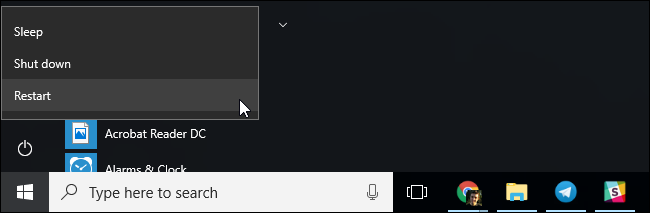
Click Troubleshoot > Advanced Options > UEFI Firmware Settings on this menu screen to access your computer’s UEFI settings screen.
This boot menu will also automatically appear if your PC is having trouble booting properly, so you should be able to access it even if your PC can’t boot Windows.
Once you’re in the BIOS or UEFI firmware menu, look for some sort of “Boot” option menu. If you’re lucky, there will be a tab at the top of the screen named Boot. If not, this option may be located beneath another tab.
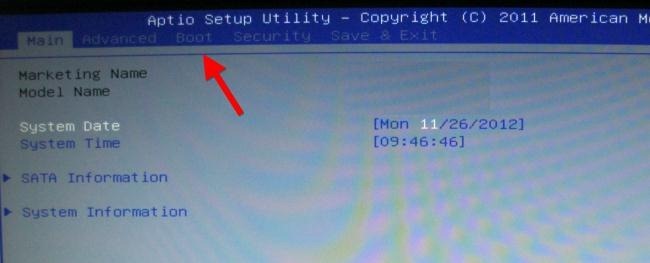
boot-tab-in-bios
Use the arrow keys to navigate through the BIOS. To select something, press Enter. You’ll generally see a list of the keys you can use at the bottom-right corner of your screen. Some newer computers with UEFI firmware may allow you to use a mouse on this screen, too.
bios-keyboard-shortcuts
Locate the boot order screen that lists the boot devices. This may be on the Boot tab itself or beneath a Boot Order option.
bios-boot-devices
Select an option and press Enter to change it, either to disable it or specify another boot device. You can also use the + and – keys to move devices up or down in the priority list. (These steps may be slightly different on some computers; consult the list of keyboard shortcuts on your screen.)
change-bios-boot-order
Note that “USB drive” doesn’t appear as an option in the list, even though our computer has USB ports. If we connected a USB device to the computer before starting our computer and accessing this screen, we’d see the USB drive option in the list. Some computers display the USB drive option even when a drive isn’t connected, while some don’t.
The boot order is a priority list. For example, if “USB drive” is above “hard drive” in your boot order, your computer will try the USB drive and, if it’s not connected or no operating system is present, it’ll then boot from the hard drive.
To save your settings, locate the Save & Exit screen. Select the “Save Changes and Reset” or “Save Changes and Exit” option and press Enter to save your changes and restart your computer.
You may also be able to press a specific key to save your settings and reset the computer. Ensure you select the “save and exit” option, not the “discard changes and exit” option.
save-bios-changes
Once your computer restarts, it will boot using your new boot order priority.

How to Access Your Computer’s Boot Menu (If It Has One)

To reduce the need to change your boot order, some computers have a Boot Menu option.
Press the appropriate key—often F11 or F12—to access the boot menu while booting your computer. This allows you to boot from a specific hardware device once without changing your boot order permanently.
computer-boot-menu
On a UEFI-based PC—again, most PCs that shipped with either Windows 8 or 10 use UEFI—you can choose a boot device from the advanced boot options menu.
From within Windows, press and hold the Shift key and click the “Restart” option in the Start menu or on the sign-in screen. Your PC will restart into the boot options menu.
Select the “Use a device” option on this screen and you can choose a device you want to boot from, such as a USB drive, DVD, or network boot.
anh bộ đội cụ Hồ .

Thursday, October 5, 2017

Muốn biết CPU của máy tính chạy 64 hay 32-bit 
Những bước để xác định máy tính của bạn có bộ xử lý 32 hay 64-bit tùy thuộc vào HĐH chạy trên máy tính của bạn . 
I/ Áp dụng trên máy tính (thiết kế để) chạy HĐH Windows . 
Nhấp vào Start và trong Start Screen hay Start Menu gỏ chữ system information và chọn biểu tượng System Information
hay
Vào Start menu chọn All Programs , Accessories , System Tools , System Information , xem hình 1 .


Ở bên phải của System Information , tìm chữ System Type nằm dưới cột Item . Nếu ở cột Value tương ứng có chữ "x86" thì CPU của máy là 32-bit ; nếu có chữ "x64" thì CPU là 64-bit .
NÊN NHỚ : bộ vi xử lý (CPU) 64-bit có thể dùng với HĐH Windows 32 hay 64-bit , trong khi CPU 32-bit chỉ dùng với Windows 32-bit . 


II/ Xác định xem HĐH Windows Vista , 7 . 8 và 10 , mà bạn xài , là 32-bit hay 64-bit .
1/ Nhấn và giử 2 phím Windows và Pause , xem hình 2 .
2/ Tìm chữ System type : sẽ là 64-bit Operating System nếu máy bạn xài HĐH Windows 64-bit ; sẽ là 32-bit Operating System nếu máy bạn xài HĐH Windows 32-bit , xem hình .


III/ Xác định xem Windows XP là 32-bit hay 64-bit .
1/ Nhấp và giử phím Windows Pause hay mở biểu tượng System trong Control Panel .
2/ Trong phần General của cửa sổ System Properties , nếu có chữ Windows XP thì máy bạn chạy Windows XP 32-bit . Nếu có chữ Windows XP Professional x64 Edition , máy chạy Windows XP 64-bit .

(còn tiếp) 
Dịch từ : https://www.computerhope.com/issues/ch001121.htm

Facebook Starts Letting You Add A 7-Second Looping Video As A Profile Pic

Next Story
To keep its decade-old social network lively, Facebook is introducing five big changes to user profiles, which are viewed 4 billion times per day:
  1. The option to pin Featured Photos to the top of the profile
  2. Temporary profile pics
  3. Easier visibility controls for About info, including a new 100 character Bio field
  4. A mobile-centric design with centered profile photos plus big sections for photos and friends
  5. The ability to use a 7-second looping video as your profile pic.
The features begin rolling out and testing today for some users.
Together, these changes should make Facebook more visually stimulating and addicting. As other networks like Twitter introduce auto-play video like Facebook did, and Snapchat adds animated selfie lenses and its own profile GIFs, Facebook has to stay a step ahead in the graphic arms race.
Meanwhile, Facebook wants to cement its profile as the center of your web presence. Snapchat hardly has a profile, and Twitter’s is basically just your most recent tweets. If Facebook can do more to let you customize how you represent yourself, you might be more willing to link back and send traffic to your profile.
Facebook’s product manager on the new profile, Aigerim Shorman, tells me it’s designed to highlight “what’s going on in their life, what’s important to them now in more expressive ways.” The most recent post you shared probably isn’t as useful for grasping your identity as biographical info or photos of you, so Facebook’s pushing that stuff above the timeline.
And finally, putting biographical info more front and center could get people to keep this information more up to date, which is critical to powering Facebook’s advertising engine. A similar overhaul of the web profile in 2010 scored Facebook immense amounts of data on where people live, where they went to school, and where they work, which has fueled its ad targeting ever since.
01-Video_GIFS_Final
Let’s break down each of the new features:

Profile Videos

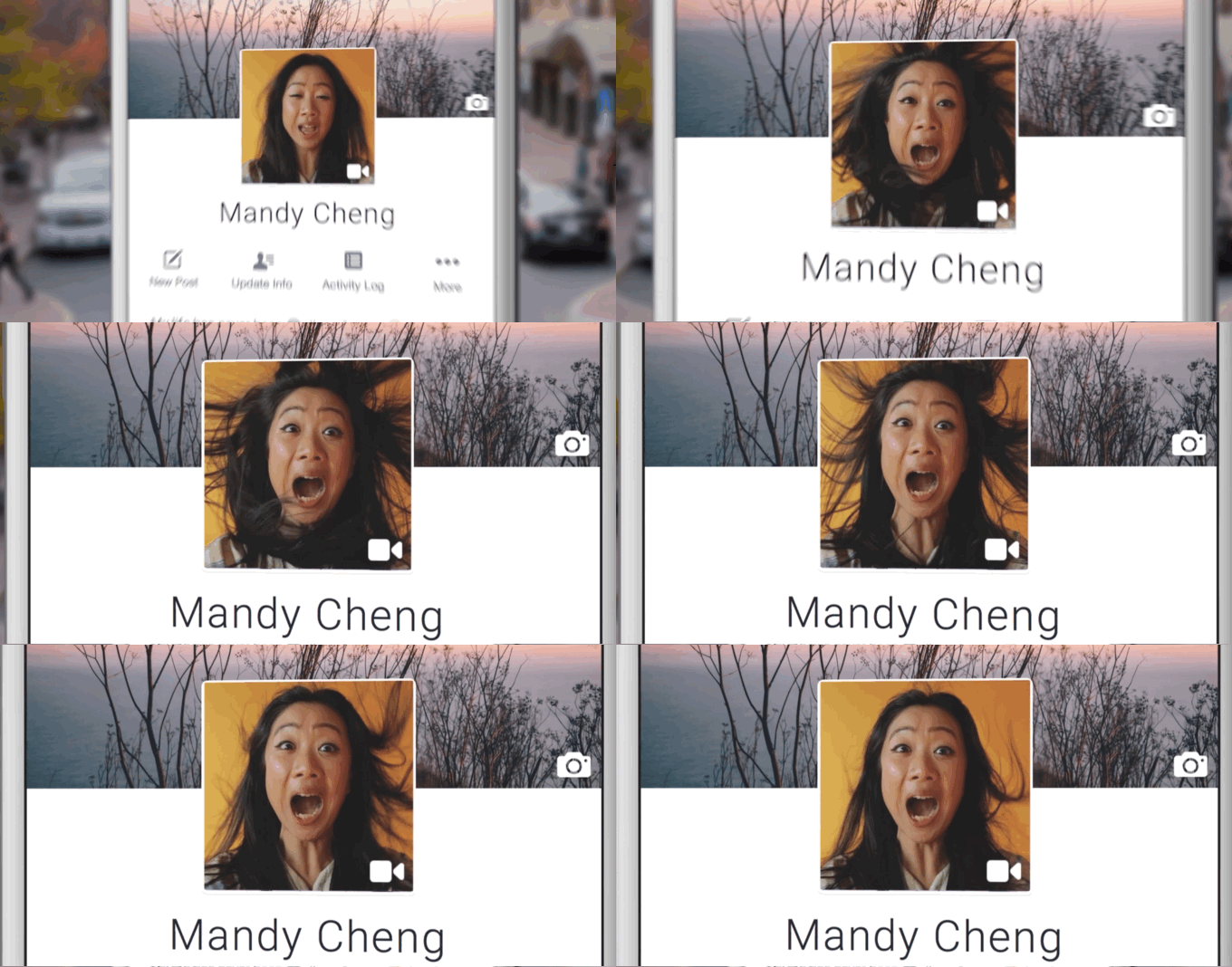
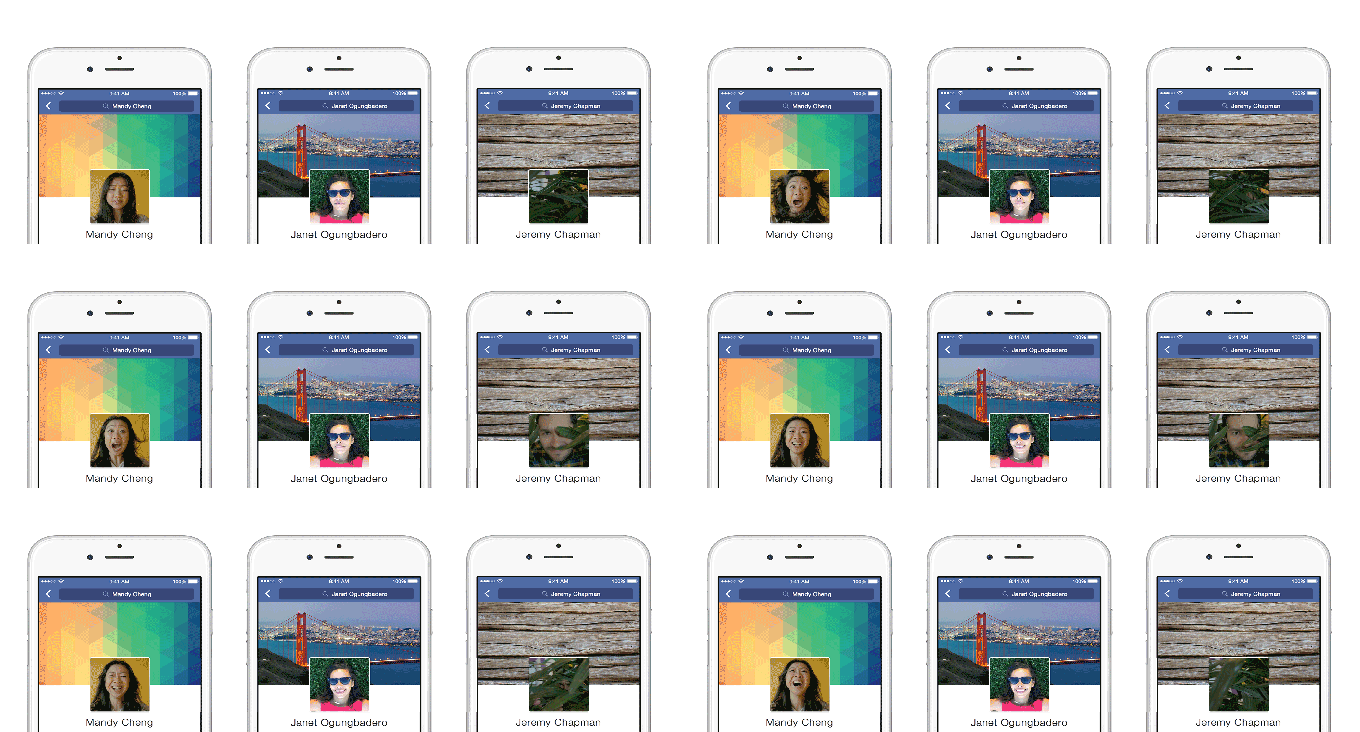
Soon you’ll be able to click on your profile pic to upload a new profile video. You tap the record button and can shoot for up to 7 seconds with sound. The looping video will auto-play without sound (unless clicked) on your profile and the feed story about you uploading it. A still cover image you select will appear everywhere else, such as the small thumbnail that appears next to your News Feed stories.
“Earlier this half [year] we were having a brainstorm, and sometimes you find a gem,” Shorman tells me. “One of my designers called me over [to look at an engineer’s] Facebook At Work account. But his profile pic was moving. I thought ‘this is going to be a great expression opportunity.’ It brought the profile to life. You got to know the person better. So we got inspired to create an option to create a profile video.” She insists the Snapchat Profile GIFs that launched in July weren’t even discussed in the feature’s creation.
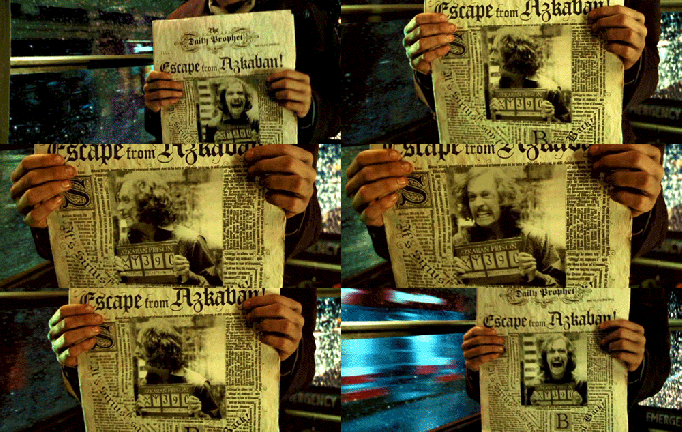
prisoner_of_azkaban_-_sirius_blackIn the examples, you’ll see Facebook employees dropping hats onto their heads, blowing their faces with air, or cracking a slow but subtle smile. The profile videos feel a bit like the Harry Potter newspapers, where photos suddenly come alive. They’re sure to unlock a ton of creativity from the user base.

Featured Photos

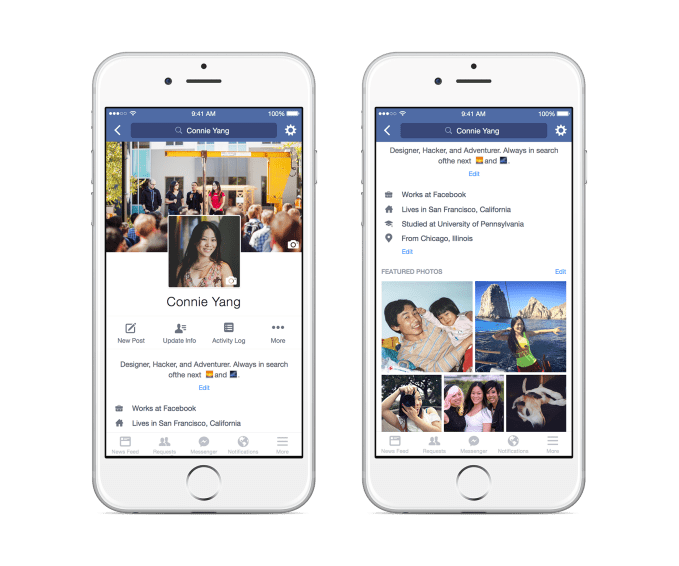
The next biggest feature is a new option to select up to five Featured Photos that will appear pinned to a section at the top of your profile. This is designed to let you give people considering your friend request or who just met you a better clue to your identity. They could show your favorite after-work activities, your pets, or just some extra selfies. Think of them as the extra photos in your Tinder profile. They’re not your main profile pic, but they’ll be used to judge you.
03-Featured-Photos_CY_Final

Temporary Profile Pics

The temporary profile pic feature I spotted Facebook testing a few weeks ago is now getting an official rollout. It lets you select a profile pic, but have yours revert to your old pic after a set number of hours, days, or weeks. It’s useful for promoting a cause, like the 26 million people who set their profile pic rainbow in support of the right to gay marriage. In some cases, Facebook even provides little tools for filtering your profile pic.

Visibility Controls And Bio

Facebook is now adding in-line privacy controls to the big About information fields that appear at the top of your profile. Those set to public will now appear immediately on the profile below your profile pic, rather than buried in the About section. You’ll also be able to describe yourself in words with a new 100-character Bio field, which could also help people figure out if they want to be your friend, as long as you keep that section public.
02_Temporary-Profile-Pic_Vacation

Mobile Design

Rather than just port the more left-aligned web profile to mobile, Facebook has built a mobile-first design. It makes the profile pic/video bigger and puts it in the center of the screen. Below, rather than small panels that open to reveal details on friends and photos, Facebook is giving both their own big sections pinned below the profile pic and above the timeline.
Profile-Redesign-SmallAt first glance, the changes might seem merely aesthetically pleasing. And truthfully, that was the only task of the team that designed them. But the repercussions for Facebook’s business could be significant, just like a similar overhaul of web profiles in 2010 was.
The more that people want to visit profiles, the more they’ll want to update their own. With biographical information now easier to see at the top of the profile, users are incentivized to keep the info like their job title current. That in turn lets Facebook accurately target these users with ads meant for “software engineers” or people who “live in San Francisco.”
It’s another smart way Facebook has managed to align its business with its user experience. People go to your profile to get to know you. News articles or weekend tales aren’t as illustrative as a profile video, featured photos, or Bio text. Pushing them to the top gives your friends, and advertisers, a better understanding of who you are.

Wednesday, October 4, 2017

TẠI SAO TA LẠI GẶP ĐAU KHỔ ?
- Muốn biết kiếp trước tạo nhân gì , hảy xem kiếp này hưởng quả gì ,
Muốn biết kiếp sau hưởng quả gì , hảy xem kiếp này tạo nhân gì -- kinh Phật .
Đạo Phật nói , mỗi ng khi ra đời đều có 1 HÀNH TRANG : đây là kết quả những việc làm trong kiếp trước .
Nếu kiếp trước , họ làm nhiều điều tốt hơn điều xấu , cuộc đời họ trong kiếp này sẽ an nhàn , ít gặp giông ba bão tố .
Nếu kiếp trước họ làm điều xấu nhiều hơn điều tốt , họ sẽ thấy nhiều điều xấu đến với họ . 
Những ng giúp ta trong kiếp này , là do kiếp trước họ đã chịu ơn , nay trả ơn .
Ng nào làm khổ ta trong kiếp này , do kiếp trước ta làm khổ y , nay y trả thù . 
Tôi nghiệm thấy , ng làm khổ tôi thì NHIỀU hơn ng giúp tôi : tôi đã bị nhiều ng ghen ghét , nói xấu tôi , v.v... một cách vô lý , dù tôi ko động chạm đến họ . Nhờ học Phật mới biết do mình đã tạo thù oán với họ trong kiếp trước . Và tôi cũng được 1 số ít ng HẾT LÒNG giúp đở tôi , dù tôi chẳng giúp gì cho họ : nhờ học Phật mới biết họ đến với mình để trả ơn . *
Vũ trụ rất CÔNG BẰNG , ko ai chịu đau khổ một cách oan ức hay vô lý : CÓ VAY THÌ CÓ TRẢ ! 
Không có Thượng đế hay Chúa hay Phật có thể gánh chịu các SAI LẦM mà ta đã tạo ra . 
Xã hội , sở dỉ bớt đau khổ chút ít vì cũng có những ng cố gắng giúp đở kẻ mắc phải sai lầm hay trong cơn hoạn nạn . Thực tế cho thấy : thường thường kẻ có TẤM LÒNG thì ÍT TIỀN và kẻ NHIỀU TIỀN thì lại ko có TẤM LÒNG . Không phải mọi người giàu đều như vậy . (Từ lúc ở VN đến hôm nay , tôi đã chứa tổng cộng NĂM kẻ homeless trong nhà hay phòng của mình , ngay cả ko biết rỏ gốc tích của họ : dì tôi đã từng nói , 'mầy chứa nó , có ngày nó sẽ giết mày'; tôi nói , 'chẳng lẽ nó lại giết ng giúp nó' . . . ) 
Tóm lại , CHÍNH mình là ng tạo hạnh phúc hay đau khổ cho mình , chứ ko phải cha mẹ hay thượng đế . Nếu cha mẹ hay thượng đế có thể giúp mình thì mình đã KHÔNG khổ như bây giờ , dù cho họ rất thương yêu mình . 
* Hồi trong tù , cuộc sống rất thiếu thốn , 1 bạn tù đã cho tôi 1 quần lót bộ đội mới tinh - mà anh mới lảnh ; tôi nhớ tới bây giờ . 
Đầu thập niên 1990 , 1 ng Pháp làm cho một NGO đã thuê tôi làm thông dịch cho ông , dù tiếng Pháp (của tôi) ko bằng đồng nghiệp học trường Pháp Marie-Curie nỗi tiếng tại SG . Ông trả lương hậu , cùng ông đi du lịch , công tác từ nam ra bắc (Đà lạt , Huế , Hà nội , Hải phòng , v.v....) bằng taxi , xe lửa , máy bay , ở ks sang trọng . Năm 1994 , biết tôi định đi Mỹ , ông rất buồn vì tôi ko còn giúp ông nữa . Tôi trả lời , đi để biết về nước mỹ , v.v... Qua Mỹ tôi ko gọi phone cho ông nhưng ông và bà vợ VN mới cưới cứ gọi hỏi thăm tôi . Ông đã nhờ bà vợ HAI lần mang tiền sang Mỹ cho tui khi bà thăm cha mẹ tại bắc Cali , dù tôi từ chối vì nói bà ở quá xa San Jose . Bà trả lời , 'vc tôi rất quí anh nên tôi phải đi gặp anh' . Năm 2011 , ông bà định mua vé để tôi về vn cùng du lịch vn với ông bà : tôi từ chối , bảo ' nên dùng tiền đó để giúp em tôi mua 1 laptop để anh em dễ liên lạc' ; ông đã đồng ý và giúp 1.200 đô . 
Và 1 số ng khác cũng giúp đở tôi (dù tôi chưa làm gì giúp họ) (còn tiếp) .

Bài này đã đăng trên FB và sau đó có thêm ba còm của tôi .

Tai Tran : Hồi 13-14 t , gia sư (tutor) nói về luân hồi nhân quả , tôi cải lại 'nếu có LHNQ tại sao tôi ko nhớ được KIẾP TRƯỚC , v.v...' Sau này , do gặp nhiều đau khổ do bịnh tật , v.v... tôi đã tìm hiểu về LHNQ . Năm 1986 , nhận dự đám tang của em gái tại chùa , tôi thấy kinh Phật ghi "trong số bà con thân thuộc của ta , có ng kiếp trước từng là KẺ THÙ , v.v..." . Tôi ko tin , nhưng sau khi chứng kiến những lục đục , tranh cải trong gia đình , trong bà con , trong gđ các láng giềng , v.v... tôi thấy điều này là ĐÚNG . Ông tổ trưởng TDP , trước kia ở nhà trệt lợp tôn , có vài đứa em ở chung với ông . Sau này nhờ bà chị VK Mỹ giúp đở xây thành 3-4 từng rất lịch sự . Mấy đứa em khác , trước đây ở ngoài , nay cũng muốn về ở . Thế là cải lộn , đánh nhau , toàn bà con (em rể đánh với anh vợ , anh đánh em , v.v...) . Ông già chỉ biết kêu Trời . Tôi liền gọi CA ; họ ngăn , nói để gđ tự thu xếp . . .
October 4, 2014 at 9:14pmEdited
LikeShow more reactions
1
Manage
Tai Tran Cùng 1 ngày , 1 đứa trẻ ra đời làm con trai của công nương xứ Anh thì cũng có 1 đứa trẻ ra đời trong 1 gđ VN nghèo khổ , sống bằng nghề bươi rác . Đứa thứ hai sẽ có triển vọng thất học , lớn lên sẽ sống trong cảnh nghèo khổ , bịnh tật , v.v... vì lúc nhỏ sống bên bải rác . Bạn giải thích như thế nào ? Chẳng lẽ nói thượng đế muốn như vậy hay TĐ muốn THỬ THÁCH đứa bé thứ hai ? Nếu nói như vậy , chẳng lẻ TĐ lại đối xử bất công : đứa này thì TĐ cho làm con vua , đứa kia cho ra đời ở bải rác ! Theo nhà Phật , do hành động TỐT và XẤU từ KIẾP trước của 2 em này , đã khiến 1 em làm con vua và 1 em sống tại bải rác . Vũ trụ đc cai quản bởi luật NHÂN QUẢ : gieo nhân nào thì hưởng quả ấy .
Trông đậu thì đc đậu , trồng khoai thì đc khoai .
Cùng 1 cha 1 mẹ , cùng chịu sự thương yêu chăm sóc như nhau mà thằng anh vào tù ra khám , còn em gái lại học hành tấn tới , có địa vị cao trong XH . Bạn giải thích thế nào : Tại vì TĐ muốn như vậy hay ngài muốn thử thách thằng anh ; thế tại sao ngài ko thử thách đứa em ?!?
October 4, 2014 at 10:11pmEdited
LikeShow more reactions
1
Manage

Tai Tran Tôi có 2 đứa cháu (con của em) : 1 lần đi xe đò hành hương ở Châu Đốc thì xe đò đụng 1 xe khác chạy ngược chiều . Trước đó thằng cháu trai đang ngồi kế bên tài xế : con cháu gái ở phía sau lên dành chổ , khi xe đụng rất nhiều ng chết và bị thương , con nhỏ này bị máu ra lổ tay , chấn thương sọ não . . . Dù sống sót những vẫn còn di chứng , đầu lúc nào cũng nghiêng và nói ngọng . Trước đó , nó thông minh và giúp mẹ rất nhiều . (Nếu tai nạn này xảy ra ở Mỹ thì cháu này ko bị di chứng nặng như vậy) .
Vậy bạn giải thích như thế nào : do di truyền , do ngẫu nhiên , do Thượng đế muốn hay thử thách đứa cháu gái (đây là ý kiến của ng theo TCG , đặc biệt là công giáo) . Bên PG giải thích , kiếp trước cháu này làm điều gì xấu , nên kiếp này trả quả . Thông thường , những ng hay CHẾ NHẠO các ng DI TẬT thường bị tai nạn gây dị tật như vậy để cảm nhận những ĐAU KHỔ của ng di tật .
October 5, 2014 at 7:35am
LikeShow more reactions

Tuesday, October 3, 2017

Nếu bạn dùng mạng wifi nơi CÔNG CỘNG * , hảy theo 10 mẹo vặt sau .
1/ Chọn mạng wifi quen biết .
2/ Phải nhớ rõ tên của mạng wifi quen thuộc , tránh những mạng wifi "nhái" , gần giống mạng wifi quen thuộc . 
3/ Tránh những hot spot mà máy bạn xếp là "unsecured" (ko an toàn) . Nên nhớ , kể cả phải nhập mật mã , một hot spot vẫn có thể ko an toàn .
4/ Nếu trang mạng được xếp là secured (an toàn) , nên chọn độ mã hóa (encryption) an toàn nhứt . Không nên chọn WEP , nên chọn WPA hay tốt nhứt là WPA2.
5/ Chỉ vào những trang mạng đứng đầu bởi chữ "https" hay có hình ổ khóa ở trên cùng (xem hình) hay cuối của trang mạng này .
6/ Trước khi dùng wifi công cộng , hảy cài các software như Force-TLS hay HTTPS - Everywhere , đây là add-on free trên trình duyệt Firefox . Software về VPN - có cái free , có cái ko - cũng thêm an toàn cho bạn .
7/ Nên thường thay đổi mật mã và tạo thêm khó khăn bằng cách thêm các dấu hiệu (symbol) như @ , # , $ , % , & , v.v... . Mỗi mật mã cho mỗi tài khoản phải khác nhau : mật mã cho Facebook phải khác với mật mã của địa chỉ email , v.v...
8/ Cập nhật hóa software chống virus và để ý đến cảnh báo trên màn hình .
9/ Tắt wifi nếu ko dùng .
10/ Dùng ĐTTM lướt mạng an toàn hơn laptop .
Dịch từ : Sid Kirchheimer , Scam-Proof Your Life .
* Như thương xá , cà phê Starbucks , McDonald , phi trường , bịnh viện , thư viện , v.v...


Monday, October 2, 2017

Đi bộ 100 dặm Anh với bịnh ALS .
Vào ngày 13/10/16 , Rick Marks , 55 t , 1 trong các giám đốc của ngân hàng Bank of America , đã biết cuộc đời mình thay đổi . Ngày đó , ng cha có 2 con này đã được chẫn đoán bị ALS , bịnh thoái hóa thần kinh tiến triển (progressive neurodegenerative disease) gây thoái hóa cơ nghiêm trọng khiến bịnh nhân ko sống quá 5 năm . Để gây quỹ trị bịnh , ông đã đi bộ 1 phần của đường mòn Appalachian . "Tôi thực hiện thách thức này , vì muốn chứng tỏ tôi làm những gì tôi có thể, " Marks nói , dù ko còn nói được (ông dùng 1 ứng dụng biến văn bản thành lời nói) và mang nẹp (brace) cổ vì cơ bắp cổ quá yếu .
Ngày 17/6 , Marks bắt đầu từ chân núi Greylock trong vùng Berkshires với mục tiêu đi bộ trong 7 tuần và về nhà kịp thời để dự 30 năm kỷ niệm ngày cưới . Càng chục bạn và thiện nguyện viên đi cùng ông để mang đồ tiếp tế cũng như giúp đở ông . Cứ vài ba ngày , Marks về nhà để nghỉ ngơi trong khi đoàn tiếp tục đi .
Khi vượt qua đoạn đường 100-dặm (160 km) vào 26/7 , ông đã gây quỹ được 118.000 đô cho tổ chức vô vị lợi ALS ONE nhằm mục tiêu tìm được cách chữa vào 2020 và ghi nhật ký mỗi ngày trên blog rickshikeforals.org . Dù ko thể leo lên những nơi cao nhứt của đường mòn này (con trai Philip sẽ leo lên đỉnh núi Katahdin 5.267 ft (1.605 m) của bang Maine) , ông nói "Tôi vẫn muốn đánh động nước Mỹ về bịnh này khi tôi có thời giờ."
Ảnh 1 : Marks , vợ Eileen 54 t , 2 con trai Henry 21 t và Philip 18 t chụp tháng 8/2016 .
Ảnh 2 : "Kể từ khi tôi được chẫn đoán , tôi đã muốn tạo 1 ảnh hưởng trên khảo cứu và đánh động mọi người," Marks (ng mặc quần trắng) nói .
Các bạn giúp ông (ng thứ hai từ phải) xuống đường mòn Crawford gần đỉnh của núi Eisenhower trong bang New Hampshire .