Sunday, October 15, 2017


LƯƠNG Y TÁ MỸ LÀ BAO NHIÊU ?


LƯƠNG BÌNH QUÂN CỦA Y TÁ LÀ 32.66 ĐÔ/GIỜ (LƯƠNG THẤP NHỨT CỦA Y TÁ CỘNG LƯƠNG CAO NHỨT VÀ CHIA HAI) TRONG KHI LƯƠNG BÌNH QUÂN CỦA CÁC NGHỀ KHÁC LÀ 22.01 ĐÔ/GIỜ .

CÙNG NGHÀNH NHƯNG MỨC LƯƠNG KHÁC NHAU DO CÔNG VIỆC (Y TÁ GÂY MÊ CAO HƠN Y TÁ THƯỜNG) VÀ DO KINH NGHIỆM , V.V... GIAO ĐỘNG TỪ 45 ĐẾN 95 NGÀN ĐÔ/NĂM . LƯƠNG BÌNH QUÂN CỦA HỌ GẦN 70 NGÀN . 

TIỂU BANG TRẢ LƯƠNG CAO NHỨT CHO Y TÁ 


NHỮNG NƠI KHÔNG PHẢI LÀ THÀNH PHỐ TRẢ LƯƠNG CAO NHỨT CHO Y TÁ

Nguồn : http://nursesalaryguide.net/registered-nurse-rn-salary/

Friday, October 13, 2017

CUỘC ĐỜI SẮC SẮC KHÔNG KHÔNG,
TRĂM NĂM CÒN LẠI TẤM LÒNG TỪ BI.

NGÀY XƯA THÂN ÁI: Hàng đứng từ trái sang phải: mợ tư, má tôi bồng con, mợ và cậu ba, con gái của ông tám (em ông ngoại) và dì năm Lang. Hàng ngồi: Tín (con dì ba Cho), bà ngoại, cậu bảy và cậu tám, ông ngoại, và chị Ma-rỉ (con dì ba Cho, hiện sống tại Houston Texas, gần Thủy-con gái đầu của cậu tư).

Thursday, October 12, 2017

DÙ ĐÃ CHẠY QUA MỸ , VC ĐÃ BÁM THEO CHÚNG TÔI BÉN GÓT !
- Cách đây nhiều năm một nhà báo đã hỏi TT Bush , tại sao Mỹ lại cho phép dịch vụ kiều hối (remittance services) hoạt động tấp nập (vì nhiều dân tộc cũng có kiều hối rất mạnh như Mễ , Phi , TQ , v.v...-- Tài) ? Ông Bush trả lời : Cuối cùng , dollar Mỹ cũng sẽ trở lại nước Mỹ !!! (Trong đó có ng giàu và quan tham VN đầu tư ngược vào Mỹ rất nhiều qua mua nhà , tiệm vàng , siêu thị , thương xá , v.v... -- Tài)
1/ Tôi lấy làm khó chịu vì có rất nhiều ng đang ở VN , tuy ngoài miệng CHỬI RỦA Mỹ và VNCH (xem đoạn 2) nhưng bản thân , con cái họ đều mong đc sống tại Mỹ !!! Tại Nam Cali , nhiều nhà 5-6 phòng sang trọng đều đc mua bởi ng Việt * , trả bằng TIỀN MẶT , nên đã gây khó chịu cho cư dân địa phương ! (theo 1 bài báo về địa ốc trong nước) . Ở Mỹ , trừ những ng quá giàu , thông thường ta chỉ có thể down payment (đặt cọc) , sau đó trả góp hàng tháng trong vài chục năm .
Bạn có thể thắc mắc : làm sao có thể chuyển 1 số tiền LỚN , vài trăm ngàn hay vài triệu đô hay hơn nữa sang Mỹ để mua nhà hay siêu thị Việt nam , v.v... tại các TP có nhiều ng Việt ? - Đó là nhờ KIỀU HỐI : khi bạn gửi 100 đô (với phí 2/100) cho ng thân khốn khó tại VN , số tiền đó vẫn NẰM ở Mỹ . (Nếu bạn gửi số tiền lớn hơn , phí sẽ gần như sẽ là zero !!! . (Trong khi gửi tiền qua cty Western Union rất cao từ 5 -10/100) . Tại sao lại nghịch lý như vậy ? ) . Các bạn tôi nói thêm , khi ta gửi tiền cho thân nhân , lẽ ra kiều hối ko nên tính phí chuyển tiền : quá đúng vì ta giúp họ (chuyển ngân lậu) . GS Nguyễn xuân Nghĩa đã viết về hình thức chuyễn ngân LẬU qua kiều hối này .
Do đó , nếu bạn muốn chuyển 1 số tiền lớn qua Mỹ , tại vn sẽ có đường dây nhận tiền của bạn (lệ phí theo thỏa thuận) và ra lịnh cho đường dây tại mỹ giao tiền đến ng thân của bạn để họ làm ăn , mua nhà , v.v... Vì ko ai ngu dại hay có thể mang số tiền lớn trong ng khi ra nước ngoài , vừa nguy hiểm và phạm luật của vn và mỹ (trên 5.000 đô tiền mặt phải khai báo) . Ngân hàng Hongkong and Shangai Banking Corporation (HSBC) có chi nhánh tại vn : bạn gửi tiền tại đây và xử dụng thẻ credit để mua sắm tại mỹ thoải mái .
Hiện nay CS đã đầu tư RẤT NHIỀU tại Mỹ như mua nhà (vì có con đi học) , hay mua tiệm vàng , nhà hàng , cửa hàng , thương xá , v.v... (để bà con đứng tên) ; vì kinh tế Mỹ ổn định , luật pháp nghiêm minh , v.v... Phần lớn các ông lớn CS đều có con đi học hay dâu/rể ng Mỹ như Ba Dũng , v.v...
2/ Tôi biết một bà trên 60 t , rất giàu có , GĐ một cty ở SG , gia đình bên bà là Việt cộng nằm vùng tại SG trước 75 , bản thân bà học trung học và chồng học ĐH Y khoa dưới chế độ cũ . Ở VN , khi gặp bạn bè , ng quen (có ng thân của tôi) , bả thường xuyên chửi bới chế độ VNCH như "mấy ông SQ chế độ cũ sao ko chết hết đi , v.v... " nhưng thằng con trai bà đang học tại San Jose và bà đã mua 1 căn nhà tại đây . Bà đi Mỹ như đi chợ vì thằng con hư hỏng , (phá gia chi tử) , đàng điếm , chơi xe xịn , nên mỗi năm bà đều qua đây vài tháng để kèm cặp nó . Thằng này đang cặp với 1 cô VN , nếu cưới sẽ ở lại . (Ba năm sau vô quốc tịch và 1 năm sau đó cha mẹ sẽ qua Mỹ) . Thằng này , khi có một CP tương lai ở vn , có thể sẽ về vn tham gia CP !!! Hiện nay thành phần gốc CS này đang có mặt RẤT NHIỀU tại Mỹ , đi học ĐH , chơi xe xịn , sống rất đế vương do tiền THAM NHŨNG của cha mẹ . . . Họ ko dám ra mặt chống đối cộng đồng tị nạn tại Mỹ nhưng trong lòng luôn hướng về CSVN .
* Họ là các quan tham hay ng giàu ở VN , nhờ bà con bên Mỹ mua nhà giùm và hiện nay tại HN và SG đều có các cty địa ốc giúp ng VN mua nhà tại Mỹ bằng cách đưa họ sang xem nhà , v.v... Ở Mỹ , mua nhà rất dễ , chỉ cần có thẻ xanh .
Comments
Bui Gia Hoa · Friends with Quang Tri Nhan and 41 others
Bài viết hay quá.! Mình share lại nhé.Thanks Tg Bạn Tai Tran & Bạn Khanh Vu Duc.!
Remove
Tai Tran @Bui Gia Hoa : bạn cứ share . Tôi hy vọng bài viết này lọt vào mắt của bà . Nói cho vui chứ thì giờ đâu mà bà lướt mạng như chúng ta : niềm vui của bà là đếm các tờ đô-la xanh càng nhiều càng tốt hay khiêu vũ hay xem phim trên mạng , v.v... Đi đâu bà cũng mang iPad loại 128 GB và đi du lịch như đi chợ . . . Đi nước ngoài mua sắm bằng thẻ của bank HSBC -- Tài . 
Nhưng bà này nên nhớ "nước lên thì cá ăn kiến nhưng nước xuống thì kiến ăn cá" .
Tôi buộc phải viết bài này vì tôi biết bà , nhưng ko chịu ko nổi thái độ "ăn cơm quốc gia thờ ma cộng sản" của bà ta . Dù gđ của bà là Việt Cộng nằm vùng nhưng bà đã chịu ơn chế độ cũ khi học trung học ở Sài gòn cũng như chồng bà (đã học ĐH Y khoa) . Sự giàu có của bà là dựa hơi CS , theo kiểu "theo đóm ăn tàn" . Sau 1975 , có những nhà - chủ ra nước ngoài * : do quen biết phường/quận nên bà chạy chọt , mua lại theo kiểu "hóa giá" rồi sửa sang bán cho ng khác hay làm tài sản của mình . Và bà phất lên bằng việc mở KS sang trọng , VP cho thuê , v.v... 
Bà phải nên nhớ "nước lên thì cá ăn kiến nhưng nước xuống thì kiến ăn cá" . 
(* Và sau đó bán "hóa giá" cho cán bộ đang ở nhà đó với giá tượng trưng ; thời gian sau đó , các CB này bán lại cho ng khác...) .
Manage
Tai Tran KIỀU HỐI là dịch vụ CHUYỂN NGÂN LẬU .
Nếu bạn chỉ gửi 100 (cước 2 đô) thì VP Kiều hối tỏ vẻ hờ hững . Nhưng nếu bạn gửi cả ngàn hay nhiều hơn , thì họ rất vui vẽ , nồng nhiệt (dù tiền cước gần như ZERO) . QUÁ NGHỊCH LÝ : Tại sao nhận tiền cước thấp như
ng họ lại hào hứng ? Vì họ hưởng huê hồng CAO nếu bạn gửi nhiều !!! Trong khi kiều hối Western Union của Mỹ thì phí từ 5-10/100 . Do vậy , tôi có thể khẳng định KIỀU HỐI là dịch vụ CHUYỂN NGÂN LẬU - mà GS NGUYỄN XUÂN NGHĨA đã viết bài tố cáo .

Friday, October 6, 2017

Boot-from-a-usb-drive-even-if-your-bios-wont-let-you

https://www.howtogeek.com/howto/16822/boot-from-a-usb-drive-even-if-your-bios-wont-let-you/
You’ve always got a trusty bootable USB flash drive with you to solve computer problems, but what if a PC’s BIOS won’t let you boot from USB? We’ll show you how to make a CD or floppy disk that will let you boot from your USB drive.
https://www.howtogeek.com/129815/beginner-geek-how-to-change-the-boot-order-in-your-computers-bios/
sshot-1
This boot menu, like many created before USB drives became cheap and commonplace, does not include an option to boot from a USB drive.
A piece of freeware called PLoP Boot Manager solves this problem, offering an image that can burned to a CD or put on a floppy disk, and enables you to boot to a variety of devices, including USB drives.
Put PLoP on a CD
PLoP comes as a zip file, which includes a variety of files. To put PLoP on a CD, you will need either plpbt.iso or plpbtnoemul.iso from that zip file. Either disc image should work on most computers, though if in doubt plpbtnoemul.iso should work “everywhere,” according to the readme included with PLoP Boot Manager.
Burn plpbtnoemul.iso or plpbt.iso to a CD and then skip to the “booting PLoP Boot Manager” section.
Put PLoP on a Floppy Disk
If your computer is old enough to still have a floppy drive, then you will need to put the contents of the plpbt.img image file found in PLoP’s zip file on a floppy disk.
To do this, we’ll use a freeware utility called RawWrite for Windows.
sshot-6
We aren’t fortunate enough to have a floppy drive installed, but if you do it should be listed in the Floppy drive drop-down box. Select your floppy drive, then click on the “…” button and browse to plpbt.img. Press the Write button to write PLoP boot manager to your floppy disk.
sshot-7
Booting PLoP Boot Manager
To boot PLoP, you will need to have your CD or floppy drive boot with higher precedence than your hard drive. In many cases, especially with floppy disks, this is done by default.
If the CD or floppy drive is not set to boot first, then you will need to access your BIOS’s boot menu, or the setup menu. The exact steps to do this vary depending on your BIOS – to get a detailed description of the process, search for your motherboard’s manual (or your laptop’s manual if you’re working with a laptop).
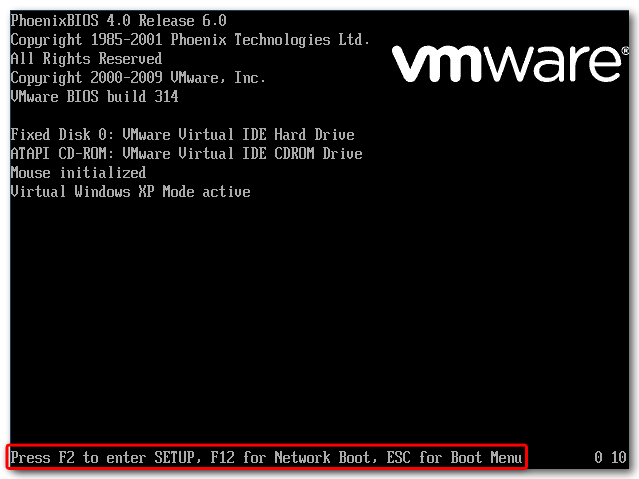
In general, however, as the computer boots up, some important keyboard strokes are noted somewhere prominent on the screen. In our case, they are at the bottom of the screen.
sshot-18
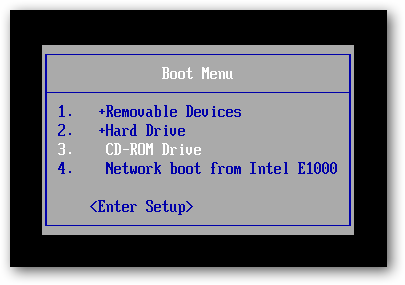
Press Escape to bring up the Boot Menu. Previously, we burned a CD with PLoP Boot Manager on it, so we will select the CD-ROM Drive option and hit Enter.
sshot-2
If your BIOS does not have a Boot Menu, then you will need to access the Setup menu and change the boot order to give the floppy disk or CD-ROM Drive higher precedence than the hard drive. Usually this setting is found in the “Boot” or “Advanced” section of the Setup menu.
sshot-17
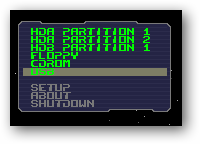
If done correctly, PLoP Boot Manager will load up, giving a number of boot options.
sshot-3
Highlight USB and press Enter.
sshot-4
PLoP begins loading from the USB drive.
sshot-5
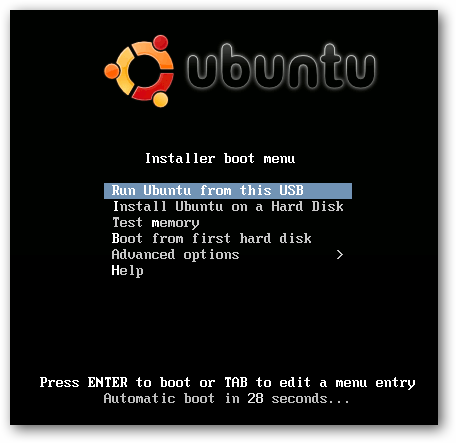
Despite our BIOS not having the option, we’re now booting using the USB drive, which in our case holds an Ubuntu Live CD!
sshot-8
This is a pretty geeky way to get your PC to boot from a USB…provided your computer still has a floppy drive. Of course if your BIOS won’t boot from a USB it probably has one…or you really need to update it.

How to Change Your Computer’s Boot Order


The boot order is controlled in your computer’s BIOS or UEFI firmware, depending on how new your computer is.
To access the BIOS, you’ll need to restart your computer and press a specific key at the start of the boot process. This key is generally displayed on-screen during the boot process. For example, you may see a message that says “Press <DEL”> to enter setup” or “Press F2 to access the BIOS.” Press the required key at the correct time and your computer’s BIOS will appear.
While Delete and F2 are probably the most common keys, your computer may require another key, such as F1, Escape, or Ctrl+Alt+Escape. If you don’t see the required key on-screen, consult your computer’s manual or search for your computer’s model name and “bios key” on Google. (If you built your own computer, consult the motherboard’s manual instead.)
bios-key-at-boot-up
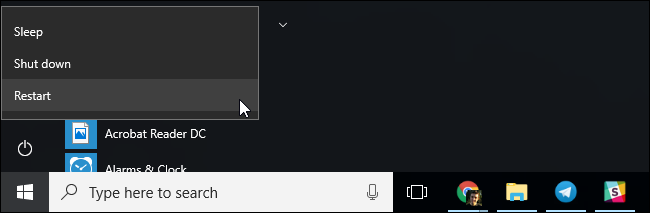
On a PC with UEFI firmware—which most newer PCs that came with Windows 8 or 10 will have—you may not be able to press a key at boot to access this menu. Instead, you’ll first need to boot into Windows. Press and hold the “Shift” key as you click the “Restart” option in the Start menu or on the sign-in screen. Windows will reboot into a special boot options menu.
Click Troubleshoot > Advanced Options > UEFI Firmware Settings on this menu screen to access your computer’s UEFI settings screen.
This boot menu will also automatically appear if your PC is having trouble booting properly, so you should be able to access it even if your PC can’t boot Windows.
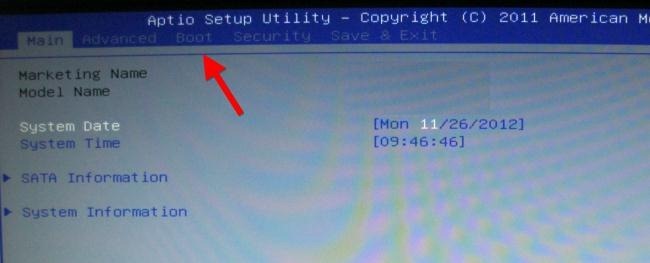
Once you’re in the BIOS or UEFI firmware menu, look for some sort of “Boot” option menu. If you’re lucky, there will be a tab at the top of the screen named Boot. If not, this option may be located beneath another tab.
boot-tab-in-bios
Use the arrow keys to navigate through the BIOS. To select something, press Enter. You’ll generally see a list of the keys you can use at the bottom-right corner of your screen. Some newer computers with UEFI firmware may allow you to use a mouse on this screen, too.
bios-keyboard-shortcuts
Locate the boot order screen that lists the boot devices. This may be on the Boot tab itself or beneath a Boot Order option.
bios-boot-devices
Select an option and press Enter to change it, either to disable it or specify another boot device. You can also use the + and – keys to move devices up or down in the priority list. (These steps may be slightly different on some computers; consult the list of keyboard shortcuts on your screen.)
change-bios-boot-order
Note that “USB drive” doesn’t appear as an option in the list, even though our computer has USB ports. If we connected a USB device to the computer before starting our computer and accessing this screen, we’d see the USB drive option in the list. Some computers display the USB drive option even when a drive isn’t connected, while some don’t.
The boot order is a priority list. For example, if “USB drive” is above “hard drive” in your boot order, your computer will try the USB drive and, if it’s not connected or no operating system is present, it’ll then boot from the hard drive.
To save your settings, locate the Save & Exit screen. Select the “Save Changes and Reset” or “Save Changes and Exit” option and press Enter to save your changes and restart your computer.
You may also be able to press a specific key to save your settings and reset the computer. Ensure you select the “save and exit” option, not the “discard changes and exit” option.
save-bios-changes
Once your computer restarts, it will boot using your new boot order priority.

How to Access Your Computer’s Boot Menu (If It Has One)

To reduce the need to change your boot order, some computers have a Boot Menu option.
Press the appropriate key—often F11 or F12—to access the boot menu while booting your computer. This allows you to boot from a specific hardware device once without changing your boot order permanently.
computer-boot-menu
On a UEFI-based PC—again, most PCs that shipped with either Windows 8 or 10 use UEFI—you can choose a boot device from the advanced boot options menu.
From within Windows, press and hold the Shift key and click the “Restart” option in the Start menu or on the sign-in screen. Your PC will restart into the boot options menu.
Select the “Use a device” option on this screen and you can choose a device you want to boot from, such as a USB drive, DVD, or network boot.
anh bộ đội cụ Hồ .